
AI tools can help you build software faster than ever. A founder can describe an idea, generate screens, create a working dashboard, build basic backend logic, and test a product concept in days instead of months.
That speed is powerful. But a working demo is not the same thing as production-ready software.
AI-generated code often looks impressive at first. The pages load. The buttons work. The app may even connect to a database or process basic user actions. But once real users, real data, payments, permissions, and business workflows are involved, the weaknesses usually start to appear.
To make AI-generated code production ready, you need to review the codebase, clean up the architecture, secure the app, fix the database, add testing, prepare deployment, set up monitoring, and create a maintenance plan.
This guide explains how to move from an AI-generated prototype to software that is safer, more stable, and ready for real business use.

What Does Production-Ready Code Mean?
Production-ready code is software that can safely support real users, real data, and real business operations.
A prototype only needs to prove that an idea can work. Production software needs to keep working after launch.
That means the app should be secure, maintainable, tested, documented, deployable, monitored, and easy enough for developers to improve without breaking everything else.
For example, an AI-generated app might let users log in and create records. That is a useful prototype. But a production-ready app also needs proper user roles, protected API routes, input validation, database backups, error handling, activity logs, and a safe deployment process.
The difference matters because users do not judge your software by how quickly it was built. They judge it by whether it works when they need it.
Why AI-Generated Code Often Breaks in Real Projects
AI-generated code is useful, but it often focuses on making the first version work quickly.
That can lead to problems later.
The app may have duplicated logic, unclear folder structure, weak security, poor database design, missing validation, and no proper testing. These issues may not be obvious during a demo, but they become serious when the app has users, customer records, payments, integrations, or admin workflows.
Many AI-built apps also focus too much on screens and not enough on systems.
A real SaaS product or web app is not just a collection of pages. It needs authentication, permissions, roles, database relationships, background jobs, billing, email flows, error tracking, backups, analytics, and maintenance.
This is why AI should be treated as a development accelerator, not a replacement for product thinking and engineering review.
We covered this idea in more detail in our guide on how AI is changing SaaS development for growing businesses.
AI Prototype vs Production-Ready Software
An AI prototype is useful because it helps you test an idea quickly. It can show what the product might look like, how users might move through it, and whether the concept is worth developing further.
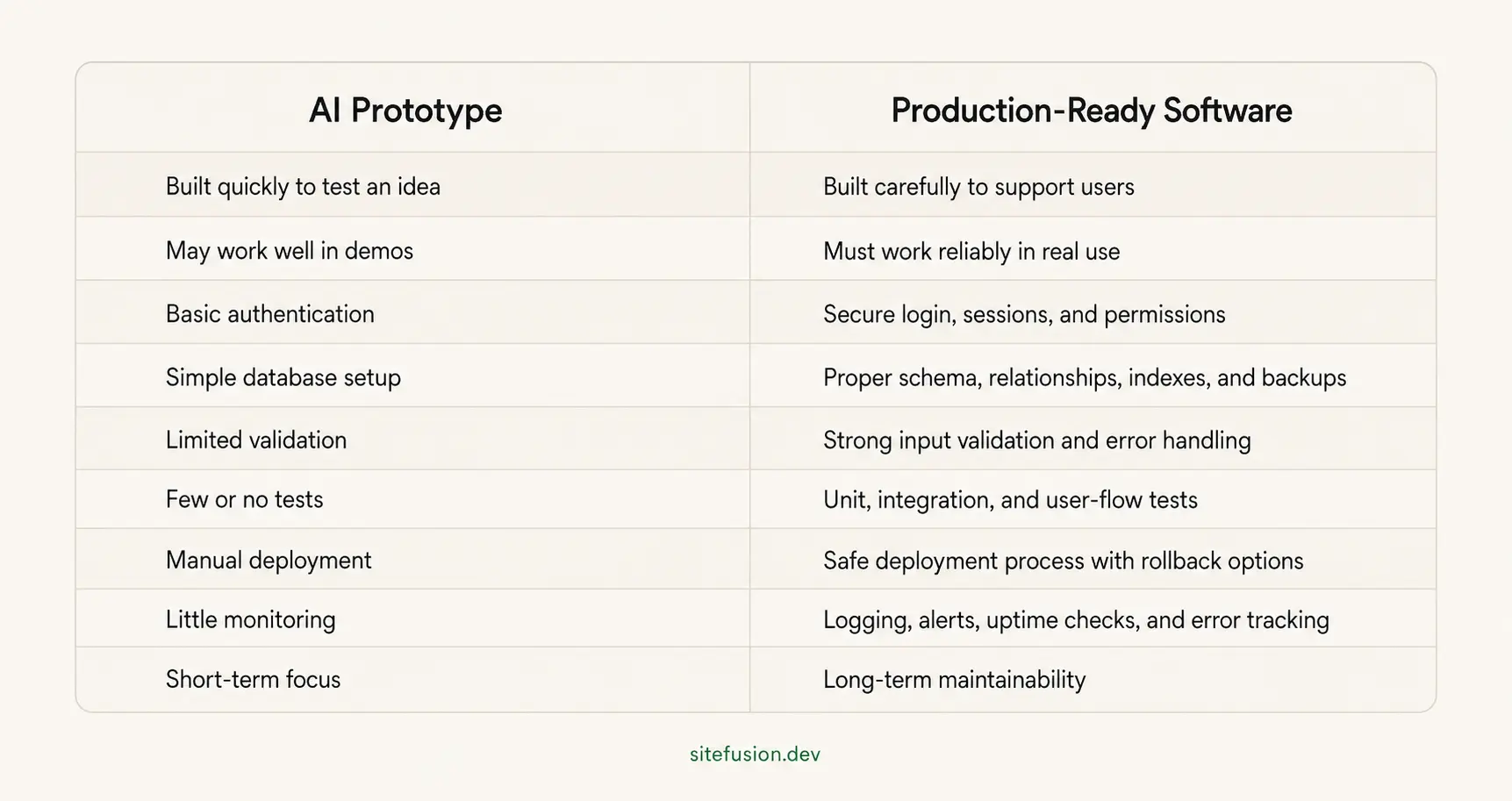
A prototype helps you learn. A production-ready product helps you operate.
Both are valuable, but they are not the same thing.
Step 1: Review the AI-Generated Codebase
The first step is a full code review.
Before changing anything, you need to understand what the AI tool created. This includes the frontend, backend, database, API routes, dependencies, environment variables, authentication logic, and deployment setup.
A proper AI-generated code review should check:
- how the project is structured
- whether the code is duplicated
- whether the naming is clear
- whether business logic is in the right place
- whether the app uses outdated packages
- whether sensitive data is exposed
- whether authentication is secure
- whether database queries are safe
- whether there are obvious performance issues
- whether the app can be maintained by another developer
This review gives you a clear picture of whether the codebase can be cleaned up or whether parts of it should be rebuilt.
Skipping this step is risky. If you keep adding features on top of a messy foundation, the app becomes harder to fix every week.
Step 2: Clean Up the Architecture
AI-generated code often solves the immediate request, but it may not organize the app in a way that works long term.
That is where architecture cleanup matters.
A production-ready app should have a clear structure. Frontend components should be reusable. Backend logic should be separated properly. API routes should follow predictable patterns. Shared functions should not be copied across multiple files. Database logic should not be scattered everywhere.
Good architecture makes the app easier to understand, test, debug, and extend.
For example, if your app has the same user permission logic repeated across ten files, that is a future bug waiting to happen. A better approach is to centralize permission checks so they can be updated safely.
Architecture cleanup may include:
- reorganizing folders
- separating frontend and backend responsibilities
- moving business logic into reusable services
- creating shared utilities
- improving API route structure
- removing duplicate code
- standardizing naming conventions
- improving state management
- simplifying complex components
The goal is not to make the code “perfect.” The goal is to make it stable, understandable, and easier to improve.
Step 3: Secure Authentication and Permissions
Authentication is one of the most important areas to review in AI-generated code.
A login form is not enough. Production-ready software needs secure authentication and proper authorization.
Authentication answers the question: Who is this user?
Authorization answers the question: What is this user allowed to do?
Many AI-generated apps create basic login functionality but fail to properly protect routes, APIs, records, and admin actions. This can lead to serious security issues.
For example, a regular user might be able to access another user’s data by changing an ID in the URL. Or a non-admin user might be able to call an admin API endpoint directly.
Before launch, check:
- password handling
- session management
- protected routes
- role-based access control
- admin permissions
- API authorization
- user-specific data access
- password reset flows
- email verification
- rate limiting
- account lockout rules
- multi-tenant data separation
If the app handles customer data, payments, healthcare data, business records, or private documents, this step becomes even more important.
Security should never be added as an afterthought.
Step 4: Fix the Database Structure
AI-generated database schemas are often too simple.
They may work for a demo, but fail when the product grows. Common problems include duplicate tables, unclear relationships, missing indexes, weak naming, poor data types, and no migration strategy.
A production-ready database should be designed around how the product actually works.
That means understanding users, roles, teams, permissions, records, payments, subscriptions, notifications, activity logs, and reporting needs.
A database review should look at:
- table structure
- relationships between records
- required and optional fields
- data validation rules
- indexes for performance
- migration files
- backup strategy
- data ownership
- multi-user or multi-company access
- audit logs
- soft deletes
- reporting requirements
Bad database design becomes expensive later because every feature depends on the data model.
If the database is wrong, new features become harder to build. Reports become unreliable. Permissions become messy. Performance becomes slower. Fixing it after users have already added data can be much more difficult.
This is why database cleanup should happen before launch whenever possible.
Step 5: Remove Hardcoded Secrets and Environment Issues
AI-generated projects sometimes include hardcoded API keys, database URLs, tokens, or secret values inside the code.
That is dangerous.
Secrets should never be committed directly into the codebase. They should be stored in environment variables and managed safely through your hosting platform, deployment system, or secret manager.
Before going live, check for:
- API keys in source files
- database credentials in code
- payment provider secrets
- exposed private tokens
- hardcoded email credentials
- insecure environment files
- public repositories containing secrets
- missing production environment configuration
You should also separate local, staging, and production environments.
A serious app should not be tested directly in production. A staging environment lets you test changes before real users see them.
This is especially important for SaaS products, internal tools, and customer portals where a bad deploy can affect business operations.
Step 6: Add Validation and Error Handling
AI-generated code often assumes that users will enter the right information.
Real users do not.
They submit empty forms, upload the wrong files, refresh during payment, enter invalid data, lose connection, double-click buttons, and use the product in ways you did not expect.
Production-ready software needs input validation and clear error handling.
Validation should happen on both the frontend and backend. Frontend validation improves the user experience, but backend validation protects the system.
You should validate:
- required fields
- email formats
- phone numbers
- file types
- file sizes
- text length
- numbers and prices
- dates
- permissions
- duplicate records
- payment states
- API request bodies
Error handling should also be improved.
Instead of showing a blank screen or a generic crash, the app should explain what happened and guide the user toward the next step.
For developers, errors should be logged clearly so the root cause can be found quickly.
Step 7: Write Tests Before Launch
Testing is one of the biggest differences between a demo and production-ready software.
AI-generated apps often have little or no testing. That makes every change risky.
Before launch, you should test the most important parts of the product. This does not always mean writing hundreds of tests on day one. It means protecting the workflows that matter most.
Start with:
- authentication tests
- permission tests
- payment tests
- form submission tests
- database update tests
- API tests
- integration tests
- core user-flow tests
- admin workflow tests
- error-state tests
For example, if your app allows customers to subscribe to a plan, you should test the full payment flow. If your app allows admins to manage users, you should test what admins can and cannot do. If your app stores important records, you should test whether users can only access their own data.
Testing gives you confidence.
Without testing, every release becomes a guess.
Step 8: Prepare Deployment and Hosting
An app that works locally is not automatically ready to launch.
Production deployment needs its own setup. The app should be hosted securely, configured correctly, and deployed in a way that does not break the product every time you make a change.
A proper deployment setup should include:
- production hosting
- staging environment
- environment variables
- SSL certificate
- domain configuration
- build process
- deployment pipeline
- rollback plan
- database migration process
- uptime checks
- backup configuration
- access control for developers
You should also define who is allowed to deploy changes and how releases are reviewed.
For small projects, this can be simple. For active SaaS products, it should be more structured.
The goal is to make deployment boring. A release should not feel like a gamble.
This connects closely to post-launch maintenance. Once your product is live, you need a process for bug fixes, updates, technical SEO, performance, and release support. That is exactly why we built our post-launch support and web app maintenance service.
Step 9: Add Monitoring, Logging, and Backups
Production-ready software needs visibility.
If something breaks, you should know before customers start sending angry messages.
Monitoring helps you understand whether the app is online, fast, and healthy. Logging helps developers investigate what happened. Backups help protect the business if data is lost or corrupted.
Before launch, set up:
- uptime monitoring
- error tracking
- performance monitoring
- server logs
- application logs
- database backups
- failed payment alerts
- failed email alerts
- security alerts
- Core Web Vitals tracking
- analytics for key product actions
For example, if checkout fails, your team should know quickly. If the app starts loading slowly, you should be able to investigate. If a background job fails, it should not disappear silently.
Good monitoring turns hidden problems into visible problems.
Visible problems can be fixed.
Step 10: Document the System
Documentation is easy to ignore when you are moving fast.
But once the app becomes important to your business, documentation saves time and prevents confusion.
A production-ready project should include basic documentation for developers, admins, and future maintainers.
Useful documentation includes:
- setup instructions
- environment variables
- deployment process
- database structure
- API overview
- authentication flow
- user roles
- third-party integrations
- payment provider setup
- known limitations
- troubleshooting notes
- maintenance tasks
This is especially important for AI-generated or vibe-coded apps because the original structure may not be obvious.
Documentation helps the next developer understand how the system works without guessing.
It also makes the app less dependent on one person.
Should You Refactor or Rebuild AI-Generated Code?
Not every AI-generated app should be rebuilt from scratch.
Sometimes the prototype is good enough to clean up. Other times, rebuilding is faster and safer than trying to fix a messy codebase.
You should consider refactoring when:
- the core product idea is validated
- the app already works reasonably well
- the database structure is usable
- the code is understandable
- security issues are limited
- the main problems are organization and cleanup
- the product needs improvement, not a full reset
You should consider rebuilding when:
- the app has no clear architecture
- the database is badly designed
- user permissions are broken
- sensitive data is handled insecurely
- every new feature breaks something else
- the code is full of duplicated logic
- the app cannot scale beyond a demo
- developers are afraid to touch the codebase
The decision should be based on risk, cost, timeline, and product goals.
A good technical review can help you decide whether to clean up what exists or rebuild the foundation properly.
Final Production-Readiness Checklist
Before launching AI-generated code, use this checklist.
Code Quality
- The codebase has been reviewed by a developer
- Duplicate code has been removed
- Folder structure is clear
- Naming is consistent
- Business logic is organized
- Dependencies are updated
- Unused files and packages are removed
Architecture
- Frontend and backend responsibilities are clear
- API routes follow a consistent pattern
- Components are reusable
- Shared utilities are centralized
- The app can support future features
- The code is understandable for another developer
Security
- Authentication is secure
- User roles are properly defined
- Admin routes are protected
- API endpoints are authorized
- Users can only access their own data
- Secrets are not hardcoded
- Environment variables are configured
- Input validation is added
- Sensitive data is protected
Database
- Tables are structured properly
- Relationships are clear
- Indexes are added where needed
- Migrations are available
- Backups are configured
- Data ownership is clear
- Reporting needs are considered
Testing
- Core user flows are tested
- Authentication is tested
- Permissions are tested
- Payment flows are tested
- Important forms are tested
- API endpoints are tested
- Error states are tested
- Regression risks are reduced
Deployment
- Production hosting is configured
- Staging environment is available
- SSL is active
- Domain is configured
- Deployment process is clear
- Rollback plan exists
- Environment variables are separated
- Database migrations are handled safely
Monitoring and Maintenance
- Error tracking is installed
- Uptime monitoring is active
- Performance is monitored
- Logs are accessible
- Backups are scheduled
- Security updates are planned
- Maintenance ownership is clear
If most of these items are missing, the app is probably still a prototype.
That does not mean the project failed. It means the product has reached the next stage.
How SiteFusion Can Help
AI-generated code can be a strong starting point.
It can help you move faster, test ideas, and see what your product might become. But once the idea matters to your business, the code needs to be reviewed and prepared properly.
SiteFusion helps businesses turn AI-generated prototypes, SaaS MVPs, internal tools, and web apps into more stable, secure, and maintainable products.
We can help you:
- review your AI-generated codebase
- identify security and architecture risks
- clean up frontend and backend structure
- improve database design
- fix authentication and permissions
- prepare deployment and hosting
- add monitoring and backups
- improve performance and technical SEO
- create a post-launch maintenance plan
If your product is already live, our post-launch support service is built for exactly this stage. We help fix recurring bugs, harden releases, clean up code, monitor performance, and keep the product moving after launch.
For more context on why this matters, you can also read our guide on how to keep your website from becoming a liability.
Final Thoughts
AI-generated code can help you build faster, but speed is only useful if the product can survive real use.
A prototype proves the idea. Production-ready software supports the business.
Before launching an AI-generated app, take time to review the code, clean up the architecture, secure the system, test important workflows, prepare deployment, and set up monitoring.
The best approach is not AI-only or human-only.
The best approach is AI-assisted development guided by strong engineering decisions.
That is how you turn a fast prototype into software that real users can trust.
Frequently Asked Questions
Can AI-generated code be production ready?
AI-generated code can become production ready, but it usually needs human review first. The code should be checked for architecture, security, database quality, testing, deployment, performance, and maintainability before it supports real users.
Why is AI-generated code risky?
AI-generated code can include messy structure, duplicated logic, insecure authentication, weak permissions, poor database design, hardcoded secrets, missing tests, and fragile deployment setup. These issues may not appear during a demo, but they can create serious problems after launch.
How do I clean up AI-generated code?
Start with a code review. Then clean up the architecture, remove duplicate logic, secure authentication, fix database structure, add validation, write tests, prepare deployment, and set up monitoring. If the foundation is too weak, rebuilding parts of the app may be safer than refactoring.
What is the difference between an AI prototype and production-ready software?
An AI prototype is built to test an idea quickly. Production-ready software is built to support real users, protect data, handle errors, scale over time, and stay maintainable after launch.
Should I launch a vibe-coded app?
You can use a vibe-coded app as a prototype, but you should be careful before launching it publicly. If the app will handle users, payments, private data, business workflows, or customer records, it should be reviewed and secured first.
Do I need a developer to review AI-generated code?
Yes, if the app is going to be used by real customers or internal teams. A developer can identify security gaps, architecture problems, database issues, deployment risks, and maintenance problems before they become expensive.
How long does it take to make AI-generated code production ready?
It depends on the size and quality of the codebase. A small prototype may need a few days of review and cleanup. A larger SaaS product may need several weeks of refactoring, testing, deployment preparation, and security work.
Can SiteFusion help make AI-generated code production ready?
Yes. SiteFusion can review AI-generated or vibe-coded apps, clean up the architecture, fix security issues, improve the database, prepare deployment, and provide ongoing post-launch support.